- Home Page /
- Electronics /
- Computer Accessories /
- Computer Accessories & Peripherals /
- Audio & Video Accessories /
- Webcams & VoIP Equipment /
- Webcams /
- Logitech C920S HD Pro Webcam Full 1080p/30fps...
0 ratings





Item #:
21363955
Logitech C920S HD Pro Webcam Full 1080p/30fps Video Calling Clear Stereo | 30fps video calling, clear stereo audio, light correction, works with
Item #:
21363955
€ 72
Price Details
Excluding Shipping & Custom charges ( Shipping and custom charges will be calculated on checkout )
*All items will import from US
In stock
 Imported from USA store
QTY:
Order now and get it around Sunday, August 23
Secured transaction
Ubuy works hard to protect your security and privacy. Our advanced payment security system ensures confidentiality by encrypting your information during transmission using AES (Advanced Encryption Standards) and SSL (Secure Socket Layer) protocols. Your payment details are 100% secure as we do not share your payment details with third party sellers.
Our Top Logistics Partners


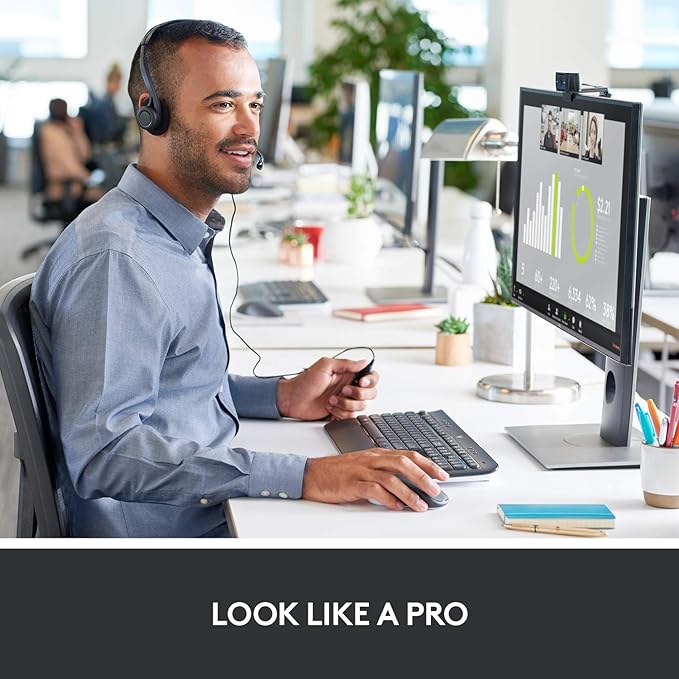
Polished, Full HD video calls

Fast
Shipping

Free
Return*

Secure Packaging

100% Original Products

PCI DSS Compliance

ISO 27001 Certified



Note: Step 1 Voltage Transformer required for using electronics products of US store (110-120). Recommended power converters Buy Now.


What Stands Out
Full HD 1080p
Experience stunning video quality with Full HD 1080p resolution at 30fps, perfect for professional video calls or live streaming.
Clear Audio
Integrated stereo microphones provide crystal clear audio, ensuring your voice is heard loud and clear during calls or recordings.
Privacy Shutter
Enhance your security with a convenient privacy shutter, allowing you to physically block the camera when not in use.
Product Details
- Logitech C920x HD Pro webcam with privacy shutter for control and lens protection
- Full HD 1080P video calls and recordings for premium video quality
- HD autofocus and light correction for sharp and vibrant videos in any environment
- Stereo audio with dual mics for capturing natural sound on calls and recordings
- Polished and professional appearance with crisp, clear, and detailed images
- Does not include the 3-month XSplit VCam license
| Sensor Type | CMOS |
| Connectivity Technology | USB |
| Color | Black |
| Special Feature | Low Light |
| Water Resistance Level | Not Water Resistant |
| Form Factor | Pro Webcam |
| Item Weight | 5.76 ounces (163.3 grams) |
| Style Name | Pro Webcam |
| Item Dimensions D x W x H | 5.4"D x 3.1"W x 5.4"H (13.7 x 7.9 x 13.7 cm) |
| Number of Batteries | 1 Lithium Ion batteries required. |
| Operating System | [Multiple] |
| Maximum Focal Length | 50 millimeters |
| Maximum Aperture | 2.8 f_stop |
| Minimum Focal Length | 1 millimeters |
| Lens Type | glass |
| Focus Type | Auto Focus |
| Screen Size | 2.7 inches (6.9 cm) |
| Viewing Angle | 78 degrees |
| Display Resolution Maximum | FHD pixels |
| Flash Memory Type | SD |
| Supported Audio Format | WAV, MP3, AAC |
| Zoom | [POSSIBLE] Smooth zoom |
| Compatible Devices | USB 2.0 compatible devices |
| Brand | Logitech |
| Model Number | 960-001257 |
| Camcorder Type | Webcam |
| Model Name | C920S HD PRO Webcam |
| Built-In Media | Privacy Shutter, User Documentation, Webcam |
| Antenna Location | video conferencing, live streaming, recording videos |
| Unit Count | 1 Count |
| Manufacturer | Logitech |
| UPC | 097855145833 |
| Global Trade Identification Number | 00097855145833 |
| Item Type Name | Logitech C920S Pro HD Webcam |
| Video Resolution | 1080p |
| Video Capture Format | H.264 |
| Effective Still Resolution | 2073600 pixels |
| Shooting Modes | Shutter Priority |
| Image Aspect Ratio | 16:9 |
| Supported Image Format | JPEG |
| White Balance Settings | Auto |
| File Format | MP4 |
| Exposure Control Type | Automatic |
| Effective Video Resolution | 1080 pixels |
| Photo Sensor Technology | CMOS |
| Video Capture Resolution | 1080p |
What's in the box
Webcam
Privacy Shutter
User Documentation
Who Should Buy?

-
Remote Workers
This webcam provides high-quality video and audio for effective communication during remote work and virtual meetings.
-
Content Creators
Ideal for YouTubers and streamers, offering full HD quality and features suitable for enhanced video production.
-
Students Learning Online
Great for online classes, this webcam ensures clear video and audio for better engagement during virtual learning.

-
Professional Studios
May not meet the high standards of professional recording studios requiring higher-end camera equipment.
Product Description
About This Item
Introducing the Logitech C920x HD Pro - The Perfect Solution for Great on-Camera Looks Are you a content creator looking to take your videos to the next level? Look no further than the Logitech C920x HD Pro. This high-quality webcam is designed specifically with creators in mind, delivering polished, full HD video calls and remarkable image quality. With its HD autofocus and light correction features, the C920x adapts to any lighting condition, ensuring consistently high definition video. The five-element glass lens provides razor-sharp images, allowing you to capture every detail with clarity and precision. Say goodbye to distorted audio quality.
The C920x features dual mics strategically placed on either side of the lens, capturing the natural sound of your voice for crystal-clear audio in your videos. But that's not all - the C920x comes with a three-month XSplit VCam license. This powerful software enables you to remove, replace, and blur your background, giving you the flexibility to create professional-looking videos from any location. Whether you're making a key Skype call, showcasing your skills, or creating content for your YouTube channel, the Logitech C920x HD Pro ensures you make a strong and lasting impression. With its exceptional video quality, advanced features, and user-friendly design, this webcam is a must-have for any content creator. Don't settle for subpar video quality.
Invest in the Logitech C920x HD Pro today and take your on-camera looks to a whole new level. Keywords: logitech c920x hd pro, logitech c920x hd pro webcam, logitech c920x hd pro camera, logitech c920x hd pro for creators, logitech c920x hd pro review, logitech c920x hd pro vs, logitech c920x hd pro specs, buy logitech c920x hd pro, logitech c920x hd pro price, logitech c920x hd pro features, logitech c920x hd pro comparison, logitech for creators, logitech for creators review, logitech for creators camera, logitech for creators c920x hd pro, logitech for creators webcam, logitech for creators streaming, logitech for creators youtube, buy logitech for creators, logitech for creators price, logitech for creators specs.
Have any Query? Chat with us
Customer Questions & Answers
-
Question:
What makes the Logitech C920S HD Pro Webcam suitable for professional video calls?
Answer: The Logitech C920S HD Pro Webcam is engineered for professional video calling with its capability to deliver Full HD 1080p at 30 frames per second. This ensures smooth, high-resolution video quality that enhances virtual meetings, whether you're using Zoom or Skype. The clear stereo audio is sourced from dual microphones that capture your voice from multiple angles, ensuring your communication is crystal clear. This combination of video clarity and audio quality makes it ideal for work-from-home professionals and online educators. -
Question:
How does light correction work on the Logitech C920S HD Pro Webcam?
Answer: The light correction feature of the Logitech C920S HD Pro Webcam utilizes advanced technology to automatically adjust exposure and enhance image quality in varying lighting conditions. This means whether you're in a brightly lit room or sitting in front of a window, the webcam adapts to keep you looking great. This functionality is particularly beneficial for users who may not have controlled lighting setups for video calls, helping to maintain a professional appearance in any environment. -
Question:
Does the Logitech C920S work with video conferencing software?
Answer: Yes, the Logitech C920S HD Pro Webcam is highly compatible and works seamlessly with various video conferencing platforms such as Skype and Zoom. This compatibility allows users to connect quickly and effortlessly without the need for extensive setup. Its user-friendly nature makes it the perfect choice for those who often switch between platforms for virtual meetings or online events, ensuring reliable performance every time. -
Question:
What additional features does the C920S HD Pro Webcam offer?
Answer: In addition to Full HD video and clear audio, the Logitech C920S HD Pro Webcam features a privacy shutter. This allows you to physically cover the lens when it’s not in use, providing peace of mind and enhancing privacy. The webcam also includes a tripod-ready design, making it easy to set up at the perfect angle on your desk or a more elevated position if desired. These extra features cater to both personal and professional users looking for convenience and security in their webcam usage. -
Question:
Can I use the Logitech C920S HD Pro Webcam for streaming purposes?
Answer: Absolutely! The Logitech C920S HD Pro Webcam is an excellent choice for streaming on platforms like Twitch or YouTube. With its exceptional video quality and sound, it allows you to deliver engaging content to your audience. The light correction and autofocus features ensure that your stream looks professional even in less-than-ideal lighting conditions, enhancing your viewer's experience. This makes it a top pick among content creators looking to up their streaming game. -
Question:
What is the installation process for the Logitech C920S HD Pro Webcam?
Answer: Installing the Logitech C920S HD Pro Webcam is straightforward. Simply plug it into your computer’s USB port, and it will be automatically recognized by most operating systems. There’s no complex software to install, but downloading the Logitech Capture software can unlock additional customization options. This plug-and-play functionality makes it an attractive choice for users seeking a hassle-free setup for their video calling needs. -
Question:
Is the Logitech C920S HD Pro Webcam compatible with Mac computers?
Answer: Yes, the Logitech C920S HD Pro Webcam is compatible with both Windows and Mac operating systems. This versatility makes it an excellent choice for users across different platforms. When connected to a Mac, the webcam ensures high-quality video calls and can work seamlessly with popular applications like FaceTime, Zoom, and Skype. This compatibility highlights its adaptability for diverse user needs, regardless of the system used. -
Question:
What resolution does the Logitech C920S HD Pro Webcam offer?
Answer: The Logitech C920S HD Pro Webcam provides a stunning Full HD resolution of 1080p at 30 frames per second. This level of detail ensures that your video calls appear sharp and lifelike, making every meeting feel more personal and engaging. Whether you're on a conference call or simply catching up with a friend, having such clarity can significantly enhance communication's effectiveness and connection. -
Question:
What kind of audio quality can I expect from the Logitech C920S HD Pro Webcam?
Answer: The Logitech C920S HD Pro Webcam features dual built-in microphones that capture clear, stereo audio. This design allows it to pick up your voice accurately from various positions, ensuring that your communication will not only look good but sound good too. This is especially important during meetings or interviews, where clear audio can significantly impact the overall quality of the interaction. -
Question:
Where can I buy the Logitech C920S HD Pro Webcam in Aland Islands?
Answer: You can buy the Logitech C920S HD Pro Webcam from Ubuy in Aland Islands. Ubuy offers a reliable platform for purchasing, ensuring you get a genuine product along with competitive service. With Ubuy, you can explore detailed product descriptions and user reviews to make an informed decision about your purchase.
Logitech Webcams 960-001257 Editorial Review


** Logitech C920S Pro HD Webcam** The Logitech C920S Pro HD Webcam has garnered mostly positive feedback from users looking for a dependable and high-quality video solution for their online needs. With its impressive 1080p resolution, clear video output, and decent audio quality, it has quickly become a favored choice for video calls on platforms like Zoom and Skype. Users appreciate the reliability of the camera, which is noted for its exceptional clarity and color reproduction. One of the standout features is the built-in privacy shutter, which provides a straightforward yet effective way to ensure security when the camera is not in use. Additionally, the webcam's easy setup process has been highlighted, allowing users to quickly integrate it into their systems without any significant hurdles. However, some users have encountered issues when it comes to software support. The Logitech Logitune software, which is recommended for adjusting picture settings, has been criticized for its clunky usability, especially when used alongside applications like Zoom. Furthermore, there have been reports of unclear instructions regarding software downloads, leading to frustration among some customers. While support representatives have been prompt, the effectiveness of their assistance has varied. Overall, the Logitech C920S Pro HD Webcam is well-regarded for its performance and reliability, offering great value for anyone seeking clear video and audio for remote communication. However, potential buyers should be prepared to navigate some software-related challenges. **
Customer Reviews & Ratings
3513 customers ratings
-
5 Star
79%
-
4 Star
13%
-
3 Star
5%
-
2 Star
1%
-
1 Star
2%
Review this product
Share your thoughts with other customers
Pros
- Excellent 1080p video quality
- Built-in privacy shutter for added security
- Easy to set up and use
- Reliable performance for video calls
- Good audio quality
Cons
- Clunky and frustrating software for adjustments
Platform Trust & Buyer Confidence

MA
Mohammad
Verified buyer
“Excellent quality and original too,when ubuy send original things I will appreciate that ,I very satisfied thank you”
23 July 2026 · via Trustpilot
CK
Chitra
Verified buyer
“The order and delivery progress was communicated very well. Package arrived within the estimated time. Products arrived as expected in good condition.”
22-Jul-26 · via Trustpilot
K
kund
Verified buyer
“Good supply of products. Safe payment methods, and shipment worldwide! Genuine products.”
23-Jul-26 · via Trustpilot
OO
Onesi
Verified buyer
“Was my first time buying a product from Ubuy, but I found it so helpful. This is reliable. Gonna place a new order!”
22 July 2026 · via Trustpilot
SJ
SAO JOHN
Verified buyer
“Ubuy is a great online platform to buy stuff. Reliable, fast delivery time and great value for money. I've been using Ubuy online shopping platform for three years now and will continue to do so.”
23 July 2026 · via Trustpilot
Secure Checkout
Global Delivery
Easy Returns
Genuine Products
Product Price History
Important information
- Limitations : For products shipped internationally, please note that any manufacturer warranty may not be valid; manufacturer service options may not be available; product manuals, instructions, and safety warnings may not be in destination country languages; the products (and accompanying materials) may not be designed in accordance with destination country standards, specifications, and labeling requirements; and the products may not conform to destination country voltage and other electrical standards (requiring use of an adapter or converter if appropriate). The recipient is responsible for assuring that the product can be lawfully imported to the destination country. When ordering from Ubuy or its affiliates, the recipient is the importer of record and must comply with all laws and regulations of the destination country.
- Not all the products listed on Ubuy are for sale, as Ubuy is a global search engine. Products are subject to export/trade regulations.
€ 72
Order now and get it around Sunday, August 23
This item is not restrict in my country.(Please click on above link if this item is not restrict in your country, So our team will review and allow.)
QTY:
Secured transaction
PCI DSS compliant and ISO 27001:2022 certified, with encrypted payments and full buyer protection on every order.
Our Top Logistics Partners
Fastest cross-border delivery
Ubuy Assurance
Experience worry-free shopping with 100% original products, PCI DSS-compliant payment security, ISO 27001-certified data protection, the fastest cross-border delivery, free returns *, and secure packaging on every order.