- Home Page /
- Electronics /
- Computer Accessories /
- Computer Components /
- Single Board Computers /
- Piper Computer Kit: Award-Winning, STEAM Lear...
0 ratings


Item #:
11843315
Piper Computer Kit: Award-Winning, STEAM Learning, with Raspberry Pi, Drag-n-Drop Coding, StoryMode, Games, Python, and Amazing Projects!
Item #:
11843315
€ 453
Price Details
Excluding Shipping & Custom charges ( Shipping and custom charges will be calculated on checkout )
*All items will import from US
0 ratings
Write a review
In stock
 Imported from USA store
QTY:
Order now and get it around Thursday, July 02
Secured transaction
Ubuy works hard to protect your security and privacy. Our advanced payment security system ensures confidentiality by encrypting your information during transmission using AES (Advanced Encryption Standards) and SSL (Secure Socket Layer) protocols. Your payment details are 100% secure as we do not share your payment details with third party sellers.
Our Top Logistics Partners


Build your own fully functioning computer from start to finish. Learn to code with progressively challenging projects. Created for kids ages 8+.

Fast
Shipping

Free
Return*

Secure Packaging

100% Original Products

PCI DSS Compliance

ISO 27001 Certified


Note: Step 1 Voltage Transformer required for using electronics products of US store (110-120). Recommended power converters Buy Now.


What Stands Out
Hands-On Learning
The Piper Computer Kit offers an engaging hands-on experience, allowing children aged 8 and up to build their own computer, fostering early interest in technology and engineering principles.
Interactive Coding
With drag-and-drop coding and StoryMode, kids can easily learn programming concepts while creating fun games, making it an ideal introduction to coding that combines creativity with education.
Creative Projects
The kit includes diverse projects using Raspberry Pi, enabling users to explore electronics and programming, which enhances problem-solving skills and creativity in a fun, rewarding manner.
Product Details
- BUILD A COMPUTER: Includes all the components needed to build a fully-functioning computer! A Raspberry Pi, 7" screen, DIY speaker, rechargeable battery. Teaching kids to be STEAM-capable; coding their own games, interactive projects and more!
- HANDS-ON STEAM PROJECTS: Building the computer is only the beginning! Using Piper’s StoryMode, kids are guided through a secret mission, attaching wires and connecting electronic components to move around an immersive world and controlling the outcome.
- LEARN TO CODE: With a Piper Computer Kit, kids learn the basics of coding with 11 progressively challenging projects using an easy, drag-and-drop visual coding language. Using PiperCode, kids progress through tangible tasks that increase their level of confidence.
- CREATED FOR KIDS: Designed by educators to foster self-paced learning, kids advance from foundational tasks through more challenging projects at their own pace. They can progress to pre-loaded Python programming language, deepening their engagement and competence.
- THE BUILD IS JUST THE BEGINNING: Piper Computer Kit features an integrated, build-it-yourself speaker and 7" HDMI screen. The kit is engineered for multi-rebuilds, with a sturdy carrying case. Beyond the build, Piper Computer Kit launches kids into an expansive, adventurous world of learning disguised as fun, with dozens of playable projects from Day One.
| Connectivity Technology | HDMI |
| Operating System | Linux |
| Processor Brand | Broadcom |
| Wireless Compability | Bluetooth |
| Processor Count | 1 |
| Smart Home Compatibility | Not Smart Home Compatible |
| Item Dimensions L x W x H | 13"L x 13"W x 4"H (33 x 33 x 10.2 cm) |
| Brand | Piper |
| UPC | 862904000346 |
| Model Number | PC02-01-001 |
| Mfr Part Number | PC02-01-001 |
| Manufacturer | Piper Inc. |
| Unit Count | 1 Count |
| Item Weight | 0.18 Kilograms |
| CPU Manufacturer | Broadcom |
| Wireless Communication Standard | Bluetooth |
Who Should Buy?

-
Young Learners
Ideal for children aged 8 and above, promoting hands-on learning in coding and computer building.
-
Educators
Teachers can effectively incorporate this kit into STEM curricula, enhancing engagement through practical projects and games.
-
Tech Enthusiasts
Great for kids interested in technology, providing a foundational understanding of computers and programming concepts.

-
Absolute Beginners
Users with no prior experience in technology may find initial setup and coding concepts overwhelming.
-
Older Adults
This kit is primarily designed for children, and older users may not find the content engaging or relevant.
-
Non-Hands-On Learners
Individuals who prefer passive learning methods may not appreciate the interactive, build-it-yourself nature of this kit.
Product Description
Have any Query? Chat with us
Customer Questions & Answers
-
Question:
What is included in the Piper Computer Kit?
Answer: The Piper Computer Kit includes all the essential components needed to build your own computer, such as a custom-built Raspberry Pi, a digital instruction booklet, a variety of electronic components, and tools for assembly. This kit provides an engaging learning experience by combining hands-on building with interactive coding challenges. Users can explore different functionalities, from coding games using Python to designing their own unique projects. Such features make it an excellent educational tool for children and adults alike. -
Question:
What age group is the Piper Computer Kit suitable for?
Answer: The Piper Computer Kit is designed for children aged 8 years and up, making it ideal for budding engineers and coders. This age range ensures that the hands-on projects are challenging yet achievable, fostering confidence and creativity in young learners. The kit's design encourages collaborative problem-solving and communication among peers, providing a fun and educational group activity for classrooms or workshops. -
Question:
Can the Piper Computer Kit be used for learning programming?
Answer: Yes, the Piper Computer Kit emphasizes learning programming through drag-and-drop coding and Python. Users can easily grasp fundamental coding concepts and apply them in a creative environment. The StoryMode feature allows learners to engage with narrative-driven coding experiences, which makes the learning process more interactive and enjoyable. This hands-on approach to programming helps solidify understanding and sparks interest in technology careers. -
Question:
Is the Piper Computer Kit suitable for beginners?
Answer: Absolutely! The Piper Computer Kit is designed specifically for beginners, offering a seamless introduction to both hardware assembly and software programming. The step-by-step instructions guide users through the assembly process and coding practices, ensuring that even those with no prior experience can successfully use the kit. This makes it a perfect choice for educational environments where foundational skills in STEM are critical. -
Question:
What kind of projects can you build with the Piper Computer Kit?
Answer: With the Piper Computer Kit, users can build a variety of projects ranging from simple computer functions to more complex interactive games. The kit encourages creativity, allowing users to engage in storytelling through coding, customize game functionalities, and even devise their own electronic contraptions. This encourages innovative thinking and fundamental skills in computer science, making it a valuable tool for any aspiring tech enthusiast. -
Question:
Does the Piper Computer Kit require any additional software?
Answer: No, the Piper Computer Kit includes all the necessary software to get started right out of the box. With built-in applications and tools designed for effective learning, users can dive straight into creating their projects without needing to install additional software. This user-friendly approach allows beginners to focus entirely on their learning experience, making it simple to navigate coding and building tasks. -
Question:
How does the StoryMode feature work in the Piper Computer Kit?
Answer: The StoryMode feature of the Piper Computer Kit engages users in an interactive story where they must solve coding challenges to progress. As learners complete tasks, they unlock new levels, allowing them to see the results of their coding efforts. This immersive experience not only reinforces programming concepts but also fosters a love for storytelling and creative problem-solving, bridging the gap between technical skills and narrative development. -
Question:
Can the Piper Computer Kit be integrated into a classroom setting?
Answer: Yes, the Piper Computer Kit is an excellent addition to a classroom curriculum, especially in STEM-focused programs. It promotes collaboration, critical thinking, and engagement among students. Educators can use the kit to facilitate lessons on computer science principles, coding, and electronics. Group projects encourage teamwork, while individual assignments foster personal growth in coding skills, benefiting students’ overall learning experiences. -
Question:
How long does it take to build a computer with the Piper Computer Kit?
Answer: Building a computer with the Piper Computer Kit typically takes about 1-2 hours, depending on the user's familiarity with the components and instructions. The assembly process is straightforward, with detailed visuals that guide users through each step. This time investment provides a rewarding experience where users can see tangible results quickly, setting the foundation for further exploration into coding and electronics. -
Question:
Where can I buy the Piper Computer Kit in Aland Islands?
Answer: You can purchase the Piper Computer Kit in Aland Islands at Ubuy. Ubuy is a trusted online platform that offers a wide selection of tech and educational products, ensuring that you find the Piper Computer Kit with ease. The website provides clear product descriptions, customer reviews, and reliable access to this award-winning kit, perfect for fostering a love for STEAM learning in young minds.
Piper Single Board Computers PC02-01-001 Editorial Review


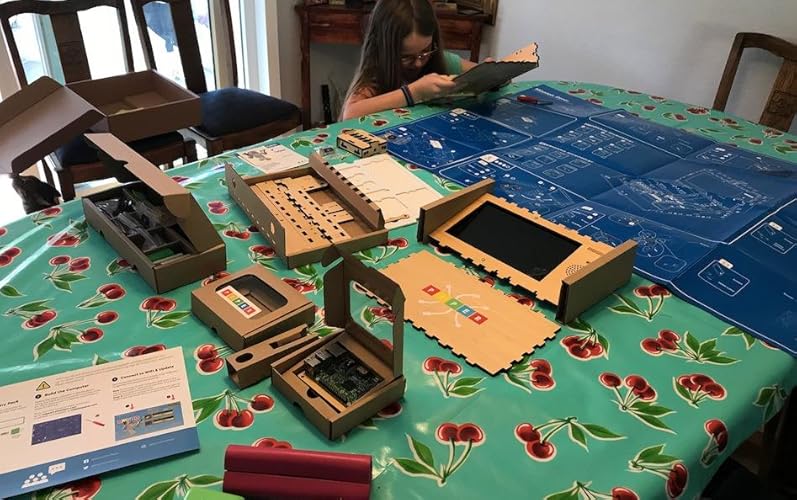


The Piper Computer Kit is a great way for kids to learn about STEAM, computer science, and electronics in a fun and interactive way. The kit arrives in pieces with detailed pictorial instructions, allowing children to assemble it themselves with adult supervision if necessary. The kit is heavy duty and designed to be assembled and disassembled repeatedly. Once assembled, kids can use it to learn how to code in Minecraft and other Linux apps. The kit is recommended for ages 8-13, but learners of all ages have found it to be an effective way to learn about computers and programming. There are some limitations to using it offline, but it's still possible to run standard Linux apps, including programming tools and games. While the kit does not come with a controller or keyboard, it can be built using the instructions provided in the first Mars mission. However, some customers have found the instructions to be outdated, and some have experienced issues with faulty parts, including the lights for programming. If you encounter any issues with the kit or have any questions, you can reach out to the Piper customer care team, although some customers have reported slow or unhelpful responses. Overall, the Piper Computer Kit is a fun and effective way for kids to learn about STEAM, computer science, and electronics, but it may require some parental guidance and patience.
Customer Reviews & Ratings
153 customers ratings
-
5 Star
67%
-
4 Star
15%
-
3 Star
5%
-
2 Star
5%
-
1 Star
8%
Review this product
Share your thoughts with other customers
Pros
- Fun and interactive way to learn about computers and programming
- Allows for experimentation with GPIO and other electronics
- Heavy duty and designed to be assembled and disassembled repeatedly
- Recommended for ages 8-13, but suitable for learners of all ages
Cons
- Instructions may be outdated or confusing
Product Price History
Important information
- Limitations : For products shipped internationally, please note that any manufacturer warranty may not be valid; manufacturer service options may not be available; product manuals, instructions, and safety warnings may not be in destination country languages; the products (and accompanying materials) may not be designed in accordance with destination country standards, specifications, and labeling requirements; and the products may not conform to destination country voltage and other electrical standards (requiring use of an adapter or converter if appropriate). The recipient is responsible for assuring that the product can be lawfully imported to the destination country. When ordering from Ubuy or its affiliates, the recipient is the importer of record and must comply with all laws and regulations of the destination country.
- Not all the products listed on Ubuy are for sale, as Ubuy is a global search engine. Products are subject to export/trade regulations.
€ 453
Order now and get it around Thursday, July 02
This item is not restrict in my country.(Please click on above link if this item is not restrict in your country, So our team will review and allow.)
QTY:
Secured transaction
Ubuy works hard to protect your security and privacy. Our advanced payment security system ensures confidentiality by encrypting your information during transmission using AES (Advanced Encryption Standards) and SSL (Secure Socket Layer) protocols. Your payment details are 100% secure as we do not share your payment details with third party sellers.
Our Top Logistics Partners
Fastest cross-border delivery
Features & Benefits
- Build your own fully functioning computer
- Learn to code with 11 progressively challenging projects
- Created for kids ages 8+
- Guided series of fun and engaging challenges
- Instant feedback makes learning exciting and enjoyable
- New & improved features including integrated speaker, 9” monitor, and more educational coding challenges